
Introduction
What is Multi Vendor eCommerce with Binary Mlm?
A Laravel eCommerce platform with a multi vendor and binary MLM (Multi-Level Marketing) plan is a powerful solution that integrates online shopping, multi-vendor management, and a structured affiliate marketing or referral and commissions system. Here's a breakdown of the features and components:
1. eCommerce Platform (Laravel-based)
This refers to a robust eCommerce system built on the Laravel framework, which is known for its security, scalability, and flexibility. Key features typically include:
- Product Catalog: Vendors can list products with descriptions, pricing, and images.
- Shopping Cart: Customers can add products to the cart, modify quantities, and proceed to checkout.
- Order Management: Customers and admin can track orders. Vendors can also manage their orders separately.
- Payment Integration: Integration with payment gateways (PayPal, Stripe, etc.) for secure transactions.
- Shipping Integration: Shipping options based on weight, location, or custom rules.
- Product Reviews & Ratings: Allow customers to rate products and leave feedback.
- Customer Accounts: Registration and login systems, along with profile management.
- Vendor Dashboard: Vendors can manage their products, view sales, and manage their profile.
2. Vendor Management System (Multi-Vendor Feature)
The multi-vendor system allows multiple vendors to sell products within the same platform, providing the following features:
- Vendor Registration: Vendors can sign up, create accounts, and list products.
- Product Management: Vendors can add, edit, or remove products from their store.
- Order Management: Vendors can manage their orders, process shipping, and update order statuses.
- Commission System: Admin can set revenue for each vendor.
- Vendor Reports: Vendors can view sales data, earnings, and performance metrics.
3. binary MLM Plan Integration
A binary MLM plan is a type of network marketing structure where each affiliate (or vendor, in this case) can recruit others into the system and earn commissions based on their recruits' sales. This plan follows a straightforward hierarchy, where:
- Level 1: A mlm user earns a commission for their direct recruits (first-level downlines).
- Level 2, Level 3, etc.: The user also earns a commission from the sales made by their recruits' recruits (second-level downlines, third-level, etc.), but the percentage usually decreases as you go deeper into the hierarchy.
Features of the binary MLM Plan:
- Affiliate Registration: customer can register as affiliates (mlm user) or promoters and start recruiting others.
- Commission Tracking: customer earn a commission for sales after become mlm user made by their downlines. The platform will track these commissions and display them on the affiliate dashboard.
- Referral Link Generation: Each mlm user or affiliate gets a unique referral link to share with potential recruits.
- Downline Management: Affiliates can see their downlines, track their sales, and view earnings.
4. Admin Control
The admin of the platform (store owner) has control over both the eCommerce and MLM aspects:
- Managing Vendors: Admin can approve or reject vendor registrations, manage revenue for vendor and oversee product listings.
- Commission Settings: Admin can set the commission percentage for the binary MLM user and customize how it’s distributed across levels.
- Reporting: Detailed reports for sales, commissions, vendor performance, and MLM structures.
- Payment Processing: Admin processes payouts to vendors and MLM affiliates.
5. Benefits of Integrating MLM into an eCommerce Platform
- Increased Sales: Affiliates help market the products, leading to more exposure and sales. Encourages Customer Loyalty: Customers who become affiliates or vendors can earn commissions, which motivates them to stay active in the system.
- Scalable: MLM systems grow as more affiliates are recruited, which can lead to exponential growth in sales and vendors.
- Customizable Commission Plans: The MLM system allows for a variety of commission schemes, depending on the business model (percentage-based, flat-rate, tiered, etc.)
- Backend: Laravel (PHP)
- Frontend: Vue.js, Blade (Laravel’s templating engine)
- Database: MySQL, PostgreSQL
- Payment Gateways: Stripe, PayPal, etc.
- Server: Apache or Nginx
- Storage: Amazon S3 or local file storage for product images and data
- Multilingual & Multi-Currency: To support global vendors and customers
Features:
- Fully Ecommerce features: product catalog, product attributes, product variations, product collections, discounts, shipping…
- Sell Simple or Variable Products
- Built-in Order Tracking page
- Unlimited Categories & Sub-Categories
- Filter Products (eg by size, color, brands, categories, etc.)
- Optional Wishlist & Compare
- Product Deals
- Gallery lightbox for product images
- Product Image Zoom
- Color, Label, and Image Swatches
- Product Quick View
- Frequently Bought Together
- Advanced Typography
- Single checkout page
- Support many payment methods: PayPal, Stripe, Paystack, Razorpay, Mollie and SSLCommerz.
- Guest checkout supported.
- Multivendor & Marketplace: easy to enable / disable multivendor features.
- Multi-language, unlimited languages support.
- Multi-currency, unlimited currencies support.
- Full RTL support.
- Page, blog, menu, contact, newsletter, slider… modules are provided with the use of components to avoid boilerplate code.
- Powerful media system, also support Amazon S3, DigitalOcean Spaces
- SEO & sitemap support: access sitemap.xml to see more.
- Google Analytics: display analytics data in admin panel.
- Translation tool: easy to translate front theme and admin panel to your language.
- Beautiful theme is ready to use.
- Powerful Permission System: Manage user, team, role by permissions. Easy to manage user by permissions.
- Admin template comes with color schemes to match your taste.
- Fully Responsive: Compatible with all screen resolutions.
- Coding Standard: All code follow coding standards PSR-2 and best practices.
- binary Mlm: Its give benefit for admin and customer in which admin add more people and cutomer can get commission.
How does binary MLM Plan work?
Binary MLM (Multi-Level Marketing) Plan is a network marketing structure where each member (distributor) recruits and manages two direct downline members, forming a two-legged (left and right) structure. This plan is popular in MLM businesses because of its simplicity and potential for rapid growth. Here's how it works:.
1. Structure of the Binary MLM Plan:
Each distributor has only two positions (legs) under them:
Left Leg
Right Leg
When they recruit new members, they place them in either leg. Any further recruits must be
placed under existing downline members.
Pairing / Matching Bonus: Members earn commissions when a pair is formed (one recruit in the left leg and one in the right). The payout depends on the weaker leg’s sales volume. Example: If the left leg has 1 sales and the right leg has 1, the system pays commissions for sum of sales of pair 1:1 then 10% or fiexd 10rs whatever defined in payout settings.
Level Commissions: In addition to direct commissions, distributors may also earn commissions based on the sales volume generated by members in their downline beyond the first level. These are often referred to as level commissions or override commissions.
Referral Commissions: Mlm User get referral commission or affiliate commission.
Join Commissions: Mlm User get join commission.
Fast Start Bonus: Mlm User get fast start bonus.
Training and Support: MLM companies typically provide training and support to help distributors succeed in building their downline and increasing sales volume.
Overall, the binary MLM Plan offers a simple and flexible compensation structure that rewards distributors for both their personal sales efforts and the efforts of their downline team. However, its simplicity may also limit potential earnings compared to more complex compensation plans such as binary or matrix plans.
Installation
Requirements ​
Before installing our script, ensure that your server meets the following requirements:
- Apache, nginx, or another compatible web server
- PHP >= 8.2 or higher
- MySQL Database server
PDOPHP extensionOpenSSLPHP extensionmbstringPHP extensionexifPHP extensionfileinfoPHP extensionxmlPHP extensionCtypePHP extensionJSONPHP extensionTokenizerPHP extensioncURLPHP extensionzipPHP extensioniconvPHP extension- Ensure the
mod_rewriteApache module is enabled
PHP Configuration ​
Open your php configuration file php.ini and change the following settings.
                                    memory_limit
                                     = 256M


                                    max_execution_time
                                     = 300
If you are using cPanel, you can follow this article to change your PHP memory limit settings.
TIP
On this project, we're using the Laravel 10.x. Please go to Laravel documentation page for more information.
Manually
You can install our script manually by following these steps:
-
Upload all files into the root folder of your hosting (normally, it is
public_html). -
Create a database and import data from
database.sql(it's located in source code).
-
Update your database credentials and
APP_URLin.env.
-
Go to
/adminto access to admin panel. -
The default admin account is
admin-12345678.
Install in a sub-folder
WARNING
Since our script is based on the Laravel framework, its root folder is
/public. If you're installing it in a sub-folder, you'll need to access
your-domain.com/sub-folder/public. To remove /public from the
URL, follow the steps in the .
TIP
For Laravel developers looking to customize the source code in platform/core
and platform/packages, delete the /vendor folder, and then run
the composer install command to reinstall vendor packages.
Install by command line.
-
Open
.envfile and set up your credentials. -
Run
php artisan migrateto create the database structure. -
Run
php artisan db:seedif you need our sample data. -
Run
php artisan cms:publish:assetsto publish assets. -
Run
php artisan serve. Openhttp://localhost:8000to see the homepage. -
Admin panel URL:
http://localhost:8000/admin -
Default admin account:
- If you use our sample data, the default admin account is
adminwith the password12345678. - If not, run
php artisan cms:user:createto create an admin user.
- If you use our sample data, the default admin account is
Settings
Admin Dashboard
The binary MLM ecommerce plan integrates multi-level marketing (MLM) features with ecommerce functionalities to create a comprehensive platform for selling products and managing a network of affiliates. Here's an overview of the key features included in the binary MLM ecommerce plan:
- Total Orders: The total number of orders placed by customer.
- Total Products: The total products create by admin.
- Total Customer: Total Customer that registered on site.
- Today's Reviews: The total number of reviews on all products. and so on.

E-Commerce Setion
- Report
- Orders
- Incomplete Orders
- Order Returns
- Shipments
- Invoices
- Products
- Product Prices
- Product Inventory
- Product Categories
- Product Tags
- Product Ottributes
- Product Options
- Product Collections
- Brands
- Reviews
- Flash Sales
- Discounts
- Customers

In the "Products Manage Category" section of the binary MLM ecommerce plan, administrators can efficiently organize and manage product categories within the MLM system. Here's a breakdown of the functionalities typically available in this section:
Create New Category: Allows administrators to add new product categories to the MLM system, facilitating the organization and classification of products for easy navigation and access by users.
Category: Displays a list of existing product categories, including their respective details such as name, parent category (if applicable), and additional actions.
Name: Indicates the name or title of each product category, providing a descriptive label that helps users identify the type or nature of products grouped under that category.
Parent: Specifies the parent category to which a particular category belongs, establishing hierarchical relationships between different levels of product categorization if necessary.
Action (Edits): Offers administrators the option to perform edits or modifications to existing product categories, including changes to category names, parent categories, or other relevant details.
By effectively managing product categories, administrators can enhance the user experience within the MLM system by providing a well-organized and intuitive product navigation structure. This facilitates users' ability to browse, search for, and purchase products more efficiently, contributing to overall user satisfaction and engagement with the MLM platform. Additionally, a well-structured product category system can also improve administrative oversight and inventory
Add Product
Enables administrators to add new products to the MLM system by providing essential details such as title, descriptions, price, stock availability, and other relevant information.
Key attributes include:
-
Title: This field represents the name or title of the product. It should be descriptive and concise, providing users with a clear idea of what the product is.
-
Price: The price field denotes the regular retail price of the product before any discounts or offers are applied.
-
Offer Price: This field is optional and represents any discounted price or offer available for the product. It should be a numeric value indicating the reduced price of the product during a promotional period or sale..
-
Category: The field categorizes the product into a specific group. This helps users navigate and filter products based on their interests or preferences.
-
Stock: This field indicates the quantity of the product available in inventory.
-
Description : Detailed information describing the product, including its features, specifications, and benefits.
In the "All Order" section of the binary MLM ecommerce plan, administrators can view and manage all orders placed within the MLM ecommerce platform, like: order status will be updated by the admin.
-
Order ID: Each order is assigned a unique identification number for easy reference and tracking purposes.
-
Order By: Displays the name or username of the customer who placed the order.
-
Products: Provides a summary of the products included in the order, including their names, quantities, and any variations selected by the customer.
-
Grand Total: Shows the total cost of the order, including any applicable taxes, shipping fees, or discounts.
-
Status: Indicates the current status of the order, such as "Pending," "Processing," "Shipped," or "Completed." This helps administrators track the progress of each order through the fulfillment process.
-
Actions (View Order): Viewing the order provides administrators with insights into the customer's purchasing behavior, allowing them to address any issues, manage inventory, and ensure timely order fulfillment.
By leveraging the "All Order" functionality in the binary MLM ecommerce plan, administrators can efficiently monitor and manage all aspects of the order fulfillment process, ultimately enhancing customer satisfaction and optimizing operational efficiency within the ecommerce platform.
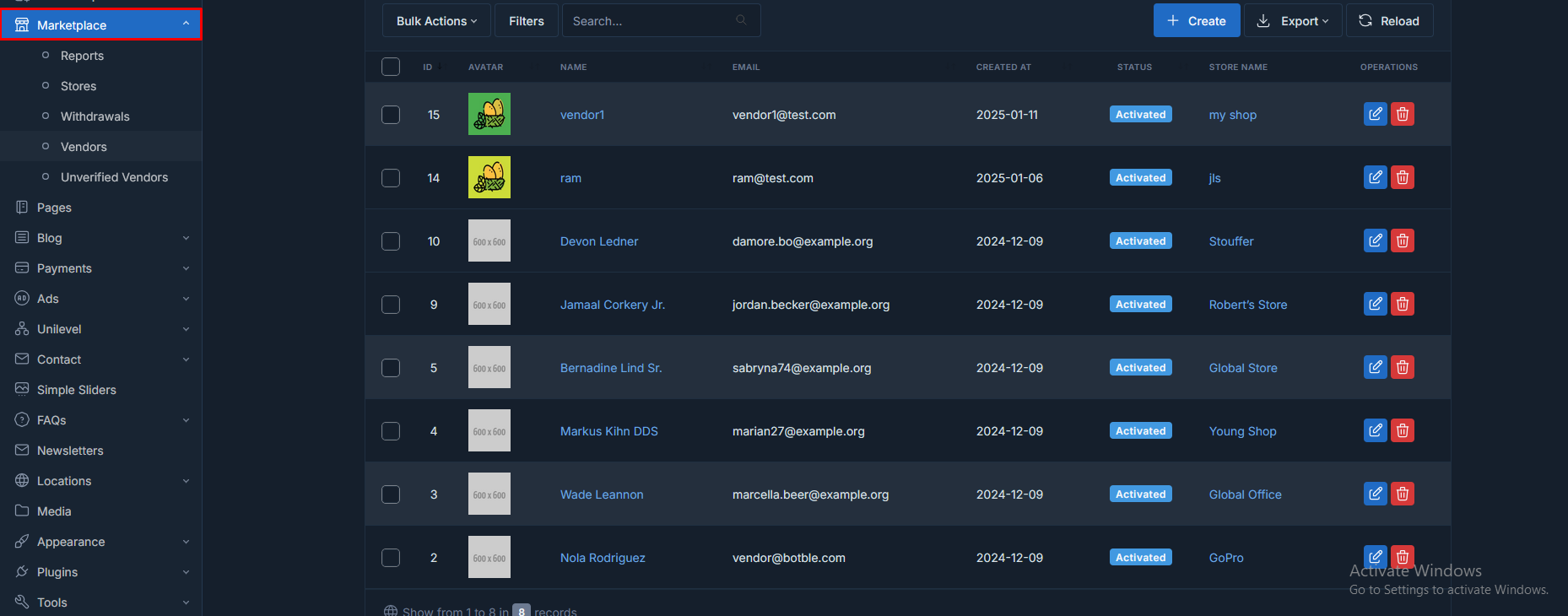
Manage Place
In thia section all about vendor related sections. Vendor withdrawal process, Approve and reject vendors and so all.
- Reports:admin display vendors reports.
- Stores:admin display vendors stores.
- Withdrawals:admin can transfer vendor earning amount.
- Vendors:admin display vendor.
- Unvarified Vendors:admin can arify and unvarified.
Page Settings
admin can create and delete pages that display on frontend.

Blog Settings
Admin can create, edit and delete blog post, blog category and blog tags that are display on frontend.
-
Blog Post : Create and delete blog post
-
Blog Category : Create and delete blog category.
-
Blog Category : : Create and delete blog tag
Blog Post Listing:

Create Blog Category:

Payment Settings
Admin can check order payment method which payment gateway use for place order and set default payment method.
-
Transaction : display all payment transaction list.
-
Payment Logs : display payment logs.
-
Payment Mehodes: Admin can set default payment methods.
Transaction List :

Set Default Payment Mehodes :

Payment Settings
Admin can create ads and add Google script in ads then that is display on frontend.
-
Ads : display all ads list.
-
Ads Settings : You can create your own ads.
Create Ads :

Binary MLM E-commerce Settings
General Settings
In the binary MLM ecommerce Plan, the General Settings section encompasses various fundamental configurations related to the MLM network structure, eligibility criteria, order mapping, and withdrawal limits. Here's a breakdown of each setting:
-
No. of Levels (Network Height): This setting determines the maximum number of levels or tiers in the MLM network hierarchy. Administrators can specify the height of the network, indicating how many levels deep the network can extend from the top-level member (root).
-
No. of Referrals (Network Width): The network width setting defines the maximum number of direct referrals or downline members that each member can have. It specifies the width of the network, indicating the maximum number of immediate downline members that a member can personally recruit.
-
WITHDRAWAL SETTING (Min Withdrawal Limit, Max Withdrawal Limit):The withdrawal settings establish the minimum and maximum withdrawal limits for members to request payouts or withdrawals from their earnings. Administrators can define the minimum amount that members must accumulate before they can make a withdrawal, as well as any maximum limits imposed on withdrawal amounts.

By configuring these general settings, administrators can define the structural parameters of the MLM network, set eligibility criteria for commissions, determine order attribution methods, and establish withdrawal limits to manage member earnings effectively within the ecommerce platform.
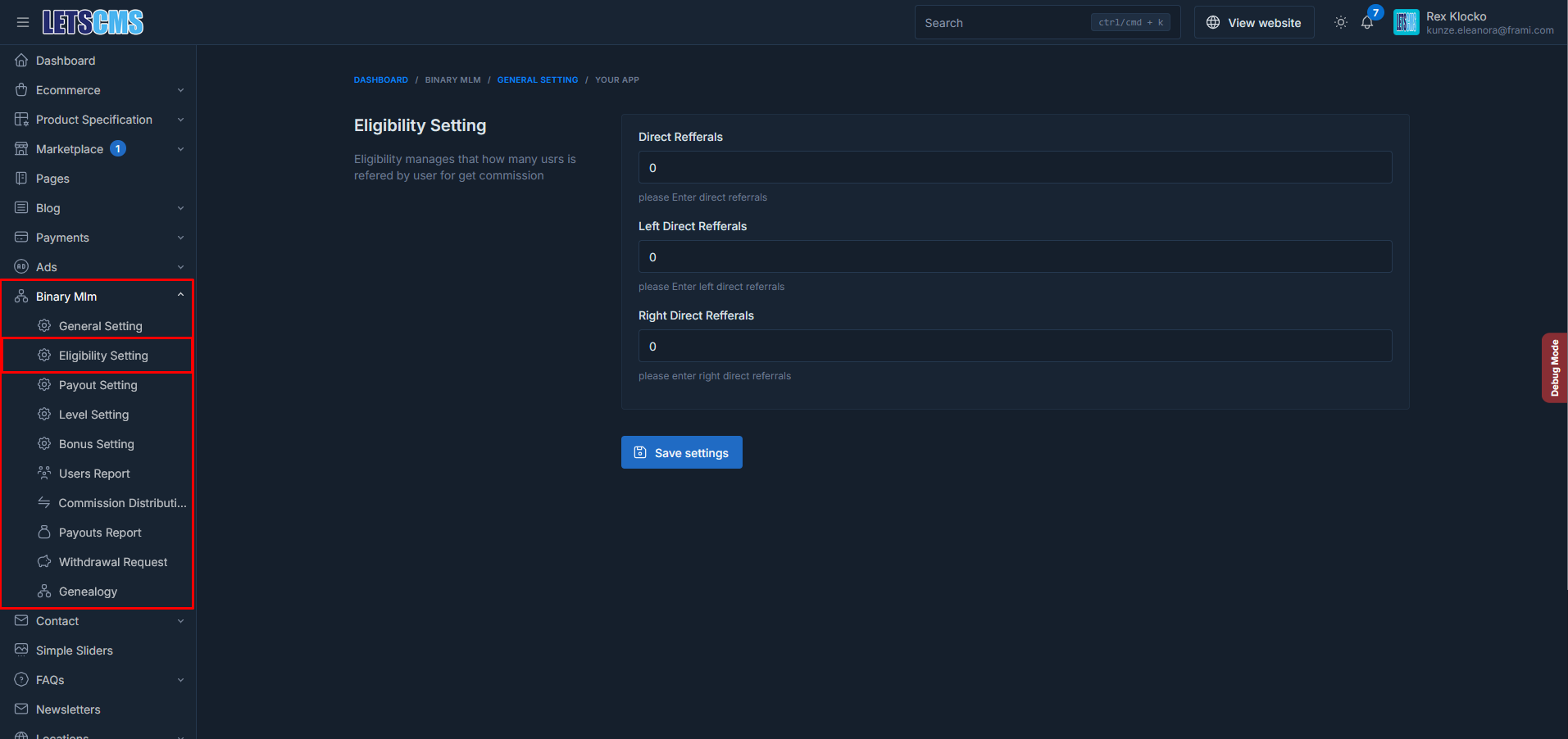
Eligibilty Settings
-
ELIGIBILITY (No. of Personal Referrer(s)): This setting establishes the eligibility criteria for members to qualify for certain commissions based on the number of personal referrers they recruit. Administrators can define the minimum number of direct referrals required for a member to become eligible for specific benefits or commissions.
Payout Settings
In the binary MLM ecommerce Plan, the Payout Settings section governs how commissions are calculated and distributed to members. Here's a breakdown of the key parameters within this section:
There are many types of commissions :-
Commission are apply on the order total amount.
Ex- Order Total Amount = 1000 and join commisson = 10 and commission type = percentage then
join commission = (1000*10)/100
join commission = 100
if commission type = fixed
join commission = 10
-
Join Commission : Join Commsission for customer it means that when user join mlm plan or register on site and purchase the then he will get the join commission.
-
Referral Commission : Referral Commsission for mlm user it means that when user share your referral link and new user is regisered by that link or fill sponsor name then new customer register on site and purchase the then sponsor will get the referral commission.


By configuring these payout settings, administrators can define the commission structure, specify the payout amounts, and determine whether commissions are calculated based on a percentage of sales or a fixed value. This flexibility allows for the customization of commission plans tailored to the specific requirements of the MLM ecommerce platform.
Deduction Settings
In the binary MLM ecommerce plan, the Deduction Settings section allows administrators to define deductions that may be applied to members' earnings or transactions within the MLM network. Here's an explanation of the parameters within this section:
-
Service Charge: This parameter represents the deduction, which helps identify its purpose or reason for being applied. service charge applied on total commission of user and deduction in earnings and after deduction amount net amount will distribute to the user as payouts
-
Amount: The amount field specifies the value or amount of the deduction that will be applied to members' earnings or transactions. This could be a fixed monetary amount (e.g., $10) or a percentage of the relevant metric (e.g., 5% of total earnings).
-
Type: This parameter determines the type of amount used for calculating the deduction. It could be specified as a fixed value or as a percentage of some relevant metric. For example, a deduction might be defined as 10% of total earnings or a flat fee of $20.

By configuring these deduction settings, administrators can manage various aspects of financial transactions and earnings distribution within the MLM network. Deductions help ensure compliance with regulatory requirements, cover operational costs, or apply penalties for specific actions or behaviors.
Level Setting
In the binary MLM ecommerce plan, the Level Settings section that is distribute to the uper level eligible user to top or first user:
- Level 1: A mlm user earns a commission for their direct recruits (first-level downlines).
- Level 2, Level 3, etc.: The user also earns a commission from the sales made by their recruits' recruits (second-level downlines, third-level, etc.), but the percentage usually decreases as you go deeper into the hierarchy.

By configuring these email settings, administrators can ensure that members stay informed about important events and transactions within the MLM network. Effective communication through email notifications can help enhance member engagement, trust, and satisfaction with the MLM platform.
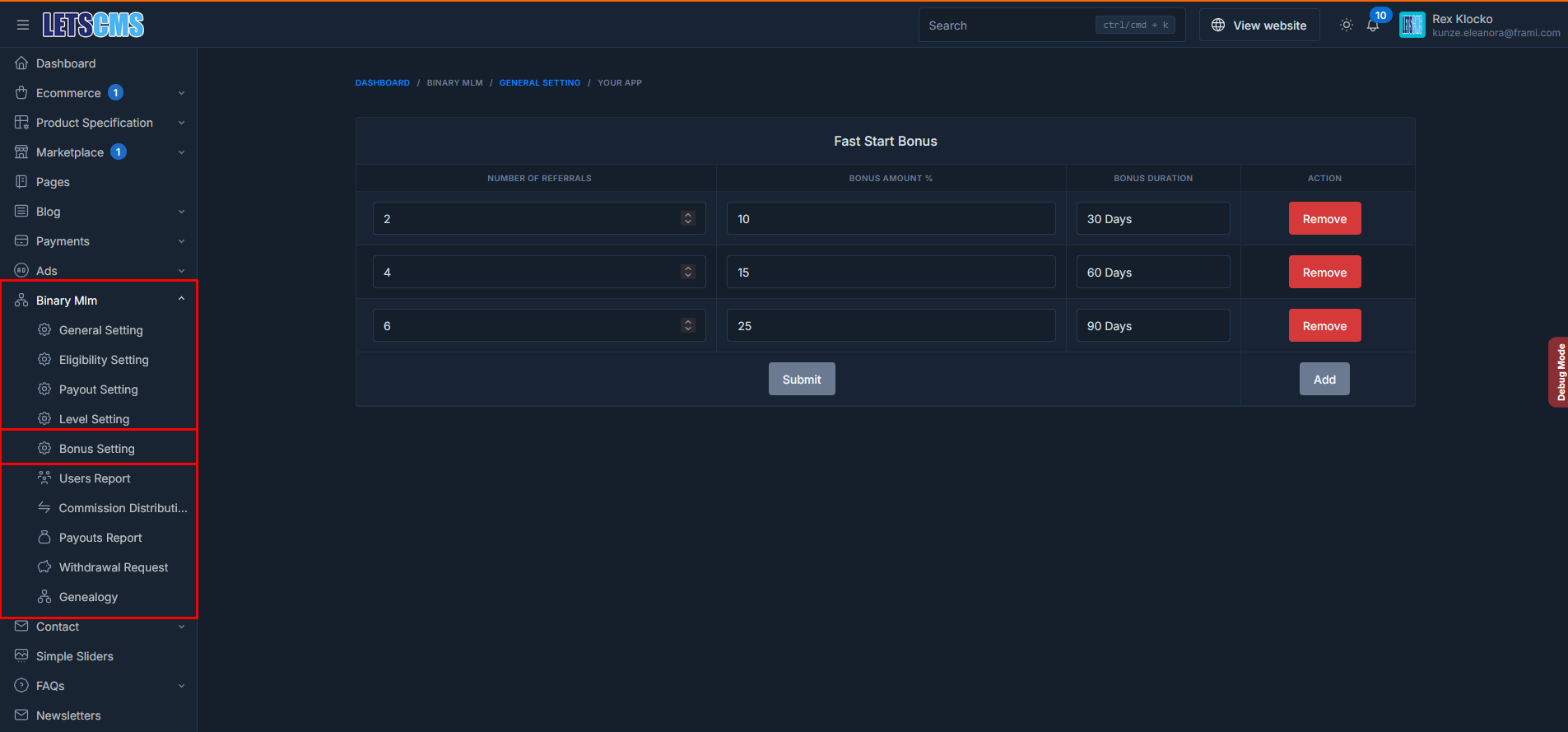
Fast Start Bonus Setting
A Fast Start Bonus is a type of bonus typically found in multi-level marketing (MLM) or referral-based business models. This bonus is usually given to individuals when they make their first sale or recruit new members within a short time frame after joining the program. Here's a step-by-step breakdown of how you can implement a Fast Start Bonus system in a Laravel-based application:
Before diving into the technical implementation, define the rules of the Fast Start Bonus:
- Eligibility:Who is eligible for the bonus? Usually, new users who join the program.
- Conditions:What does the user need to do to earn the bonus? (e.g., make their first sale, recruit a certain number of people).
- Amount:How much will the bonus be? It could be a amount on percentage based on sales/referred users. Time Frame: Typically, the Fast Start Bonus must be earned within a specific period (e.g., 30 days).
Email Setting
In the binary MLM ecommerce plan, the Emails Settings section allows administrators to configure various email notifications that are sent out to members based on different events or actions within the MLM network. Here's an explanation of the types of emails that can be configured:
- Welcome Email: This email is sent to new members when they join the MLM network. It typically includes a warm welcome message, important information about getting started, and possibly instructions on how to access their account or dashboard.
- Network Growing Email: This email is triggered when a member's network experiences growth, such as when they successfully recruit new members .
- Withdrawal Initiated Email: When a member initiates a withdrawal request, this email confirms that their request has been received and is being processed. It may provide an estimated timeline for the completion of the withdrawal and any additional instructions or requirements.
- Withdrawal Processed Email: Once a withdrawal request has been processed and the funds have been transferred to the member's designated account, this email informs them that the transaction is complete. It may include details such as the amount withdrawn, the payment method used, and any transaction IDs for reference.
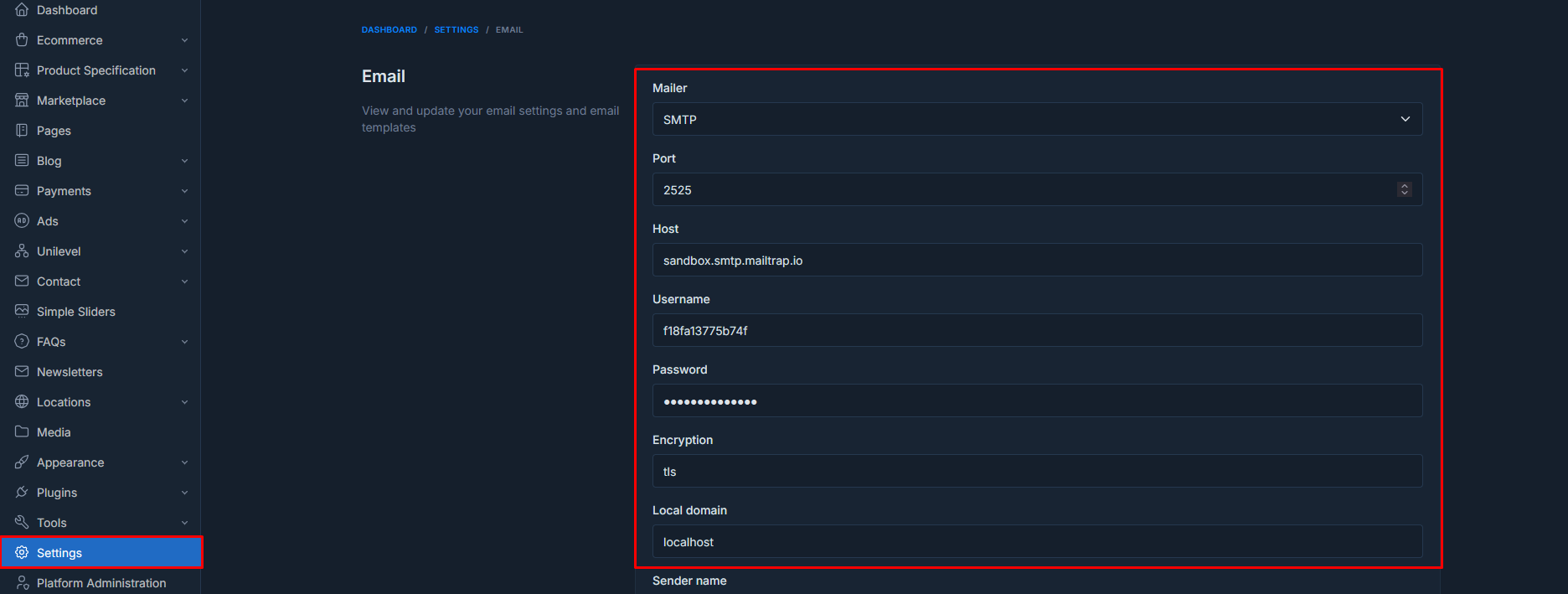

By configuring these email settings, administrators can ensure that members stay informed about important events and transactions within the MLM network. Effective communication through email notifications can help enhance member engagement, trust, and satisfaction with the MLM platform.
Distribute Commission
A commission distribution refers to the allocation of earnings among individuals or parties involved in a sales or service transaction. Typically, it is based on predefined agreements or percentages. For example, in a sales team, commissions may be distributed according to individual contributions, team targets, or roles. Clear policies on commission distribution ensure fairness, transparency, and motivation for all participants.

After complete the order commission will be display in distribute commission section.
There some steps to complete order and get commssions
Goto:- Ecommerce->Orders->click edit order->click on complete order->payent complete->update shipping status->select delivered->update.
after follow this process commission will be display
Note:- Customer shoud be binary mlm user then it will display other it will not display
Users Report
binary mlm users reports in which check commissions and profile detials and also display single user details by click on view button.
-
Users Earning: admin check user earning like referral commission, join commission and level commission and withdrawal history as well

user commissions and withdrawal history


Payouts Report
binary mlm payouts reports in which check commissions and profile detials and also display single payou details by click on view button.
-
User Commission: admin check user earning like referral commission, join commission and level commission and payout on the basis of payout id.
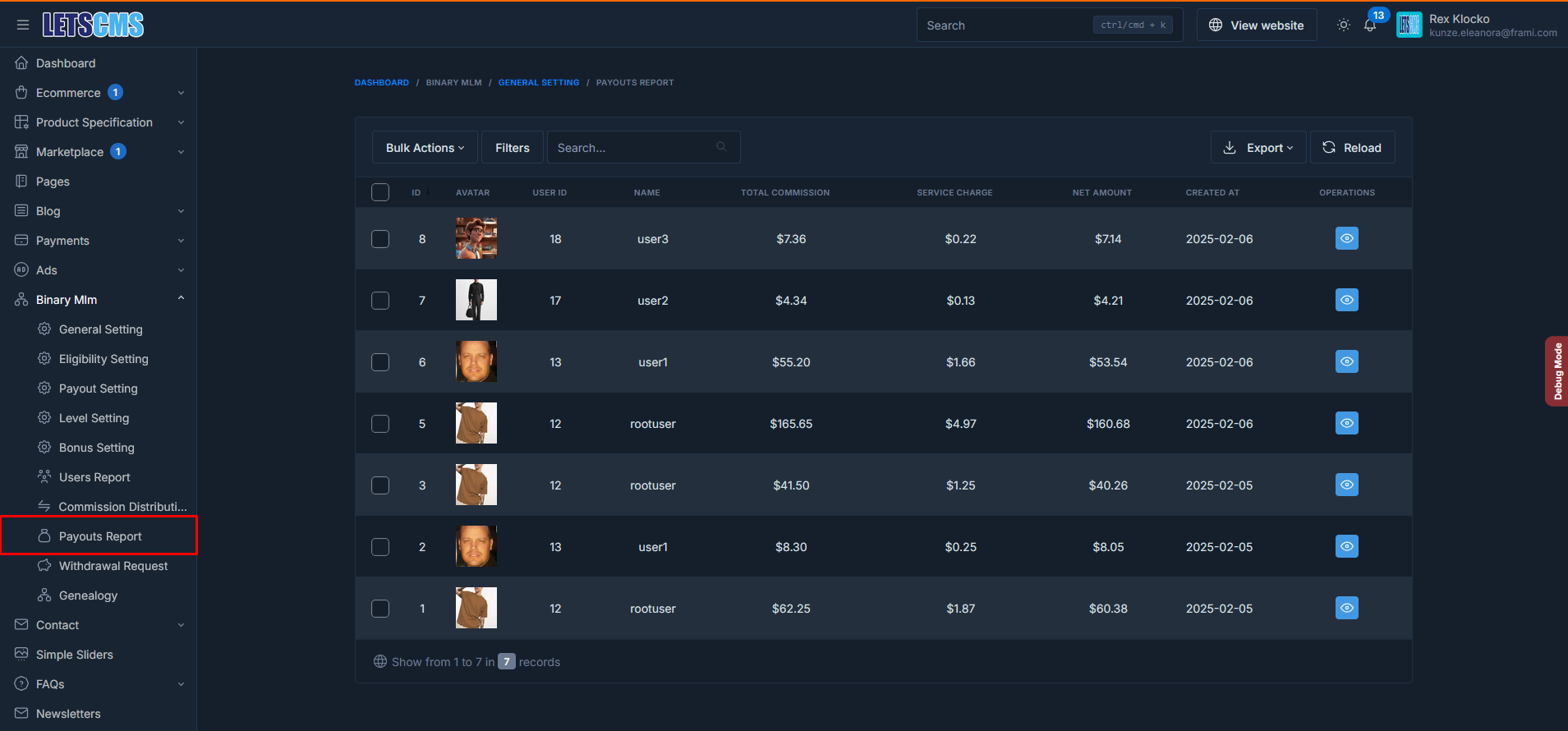
user commissions and withdrawal history


Withdrawals
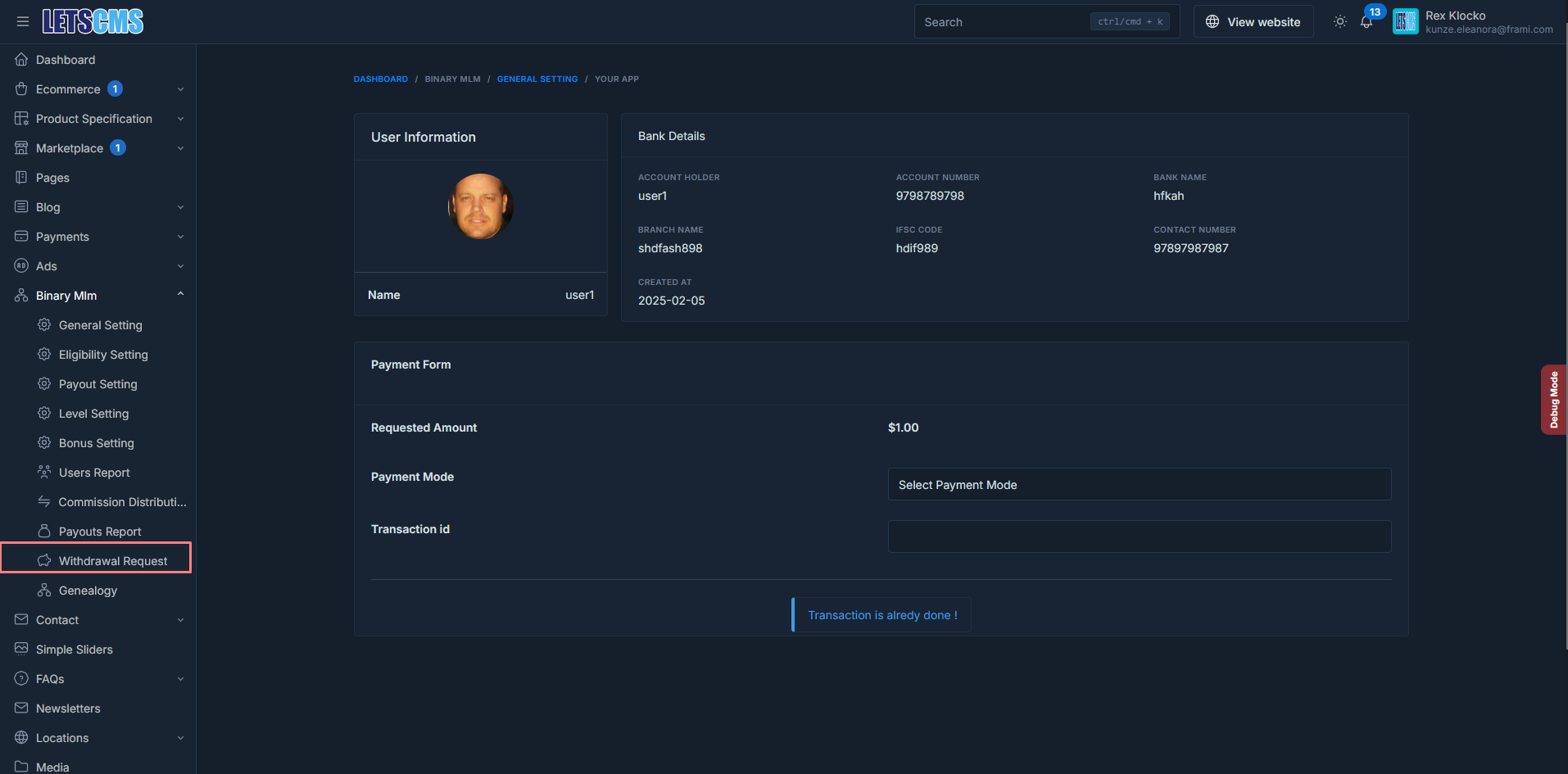
In the binary MLM ecommerce plan, the "Withdrawals" feature enables members to request withdrawals of their earnings from the MLM platform. Here's a breakdown of the information typically included in the Withdrawals section:
-
Username: This column displays the usernames of members who have requested withdrawals.
-
Amount: Indicates the amount requested for withdrawal by the member.
-
Payment Method: Specifies the payment method chosen by the member for receiving their withdrawal amount, such as bank transfer, PayPal, or other available options.
-
Transaction ID: Displays the unique identifier associated with the withdrawal transaction for tracking and verification purposes.
-
Status: Indicates the current status of the withdrawal request, such as pending, processed, or rejected.
-
Requested At: Shows the date and time when the withdrawal request was submitted by the member.
-
Actions: Provides options for administrators to manage withdrawal requests, including approving, rejecting, or processing them. Additional actions may include viewing transaction details or contacting the member for further information if needed.

Overall, the Withdrawals section facilitates the efficient management of withdrawal requests within the binary MLM ecommerce plan, ensuring transparency, security, and timely processing of member earnings.
Withdrawal request amount pay by this form
Genealogy
In the binary MLM ecommerce plan, the "Genealogy" feature allows administrators to visualize and manage the hierarchical structure of their MLM network. Here's a breakdown of the two types of genealogy views available:
-
Basic Genealogy: The Basic Genealogy view provides a simplified representation of the MLM network structure. It typically displays the direct referrals of each member in a tree-like format, showing their downline members in subsequent levels. This view offers a quick overview of the network's structure and allows administrators to navigate through different levels of the hierarchy.

Contacts
admin can display customers contacts details
- Contact List
- Contact Fields
Sliders
admin can add multiples siders that can be display on the frontend and add slider shortcode where you want to display slider

FAQs
You can create multiple FAQs and also create Categories and devide FAQS in multiple categories.
- FAQs
- Categories

Location
You can add location fields in location
- Countries:-create or add country
- States :-create or add state
- Cities :-create or add city
- Location Inporter:-location importer is a tool, software feature, or script designed to import geographical data (such as addresses, GPS coordinates, or map locations) from external sources (e.g., files, databases, APIs) into a system or platform
- Location Exporter:-export same above

Media
You can create folder and upload images for store images

Appearance
Menu
You can add and remove menu items like main menu , header menu etc that are display on frontend

Widget
You can add widget form this section

there some more options in appearance like
- Theme Option;-you can add preloader and enable the loader and disable loader.

- Custom CSS:- you and add custom css
- Custom JS:- you and add custom js
- Custom HTML:- you and add custom html
- Robot Txt Editor:- Its help for SEO
Plugins
You can active and deactive and installed and remove the plugins
- Intalled Plugin:-Install plugin like binary mlm and different plugins also
- Add New :- Add new custom plugins

Tools
You can import and Export Product, Category, Order etc.

Settings
There are many settings like Genaral Settings, Email Settings, plugins settings (binary Settings)


Platform Administration
You can check system users, roles and permissions etc.
You can assign the permissions for users on the basis of user roles.


Frontend - binary Mlm eCommerce plan with Vendor in Laravel Technology
Home Pages - binary MLM Ecommerce Plan with Vendor

User Registration & Login
Use Registration Form
Vendor can not become mlm user only cutomer become mlm user only. So If you want mlm user you have select become customer not become a vendor.
-
Users navigate to the registration page and fill out a form with required information such as username, email address, password, and additional details as needed.
-
The registration form may include fields specific to the MLM ecommerce plan, such as Sponsor Name.
-
Upon submitting the registration form, the system validates the user input, checks for duplicate accounts or invalid data, and then creates a new user account in the database.
-
After successful registration, the user receives a welcome email.

User Login Form :- Use login useing email and Password

My Account
Overview
Overview:- In this section customer update your picture and goto oreders and goto edit account setting etc.

Orders
Customer can display your orders and display order details by click on view button

Order Details

Reviews
Customer can add review on the product and then admin will reply something it will display like below image

Download
Display downloaded products or we can say digital products

Return Order Request
Return Order :- Here display return order produts

Addresses
Customer can display your addresses and he can also add new address in this section

Update Address

Delete Address:
Account Settings
In Account Settings there are two setion in which first one is Profile and Second is Change Password
Profile:
-
Customer can access their profile page to view their current account information, such as their Full Name, Date of birth, Email, Phone details. This section may also display additional information delete account etc. Customer update your account settings.

Change Password :
-
User can change or update your password from here. There some fields like Current password, Password and Password confirmation.

Update Password

User Mlm Section
Dashboard
"Mlm User Dashboard" provides an overview of their MLM business performance and activities. Here are some key components typically found on the dashboard:
-
Total Earning: This section displays the total amount earned by the user through various commissions and rewards in the MLM program.
-
Total Service Charge: Admin can apply some charges on total commission.
-
Total Net Income: User net income means user can withdraw net earning amount after deduct service charge from total commission earnings.
-
Total Referrals: Users can see the total number of direct referral members they have recruited or sponsored in their MLM network.
-
Total Withdrawals: This section shows the total amount of funds withdraw by the user from earnings in the MLM program.
-
Earnings & Withdrawal Graph: User earnings and withdrawal amount display by graph in which user can check earning and withdrawal on the basis of month and yearly.
-
Commissions Chart: User can display our all commission by chart like join commission, referral commission and level commission.

By providing users with access to these dashboard components, the binary MLM ecommerce plan offers valuable insights and tools to help them monitor their progress, track earnings, and manage their MLM business effectively.
Referral Link
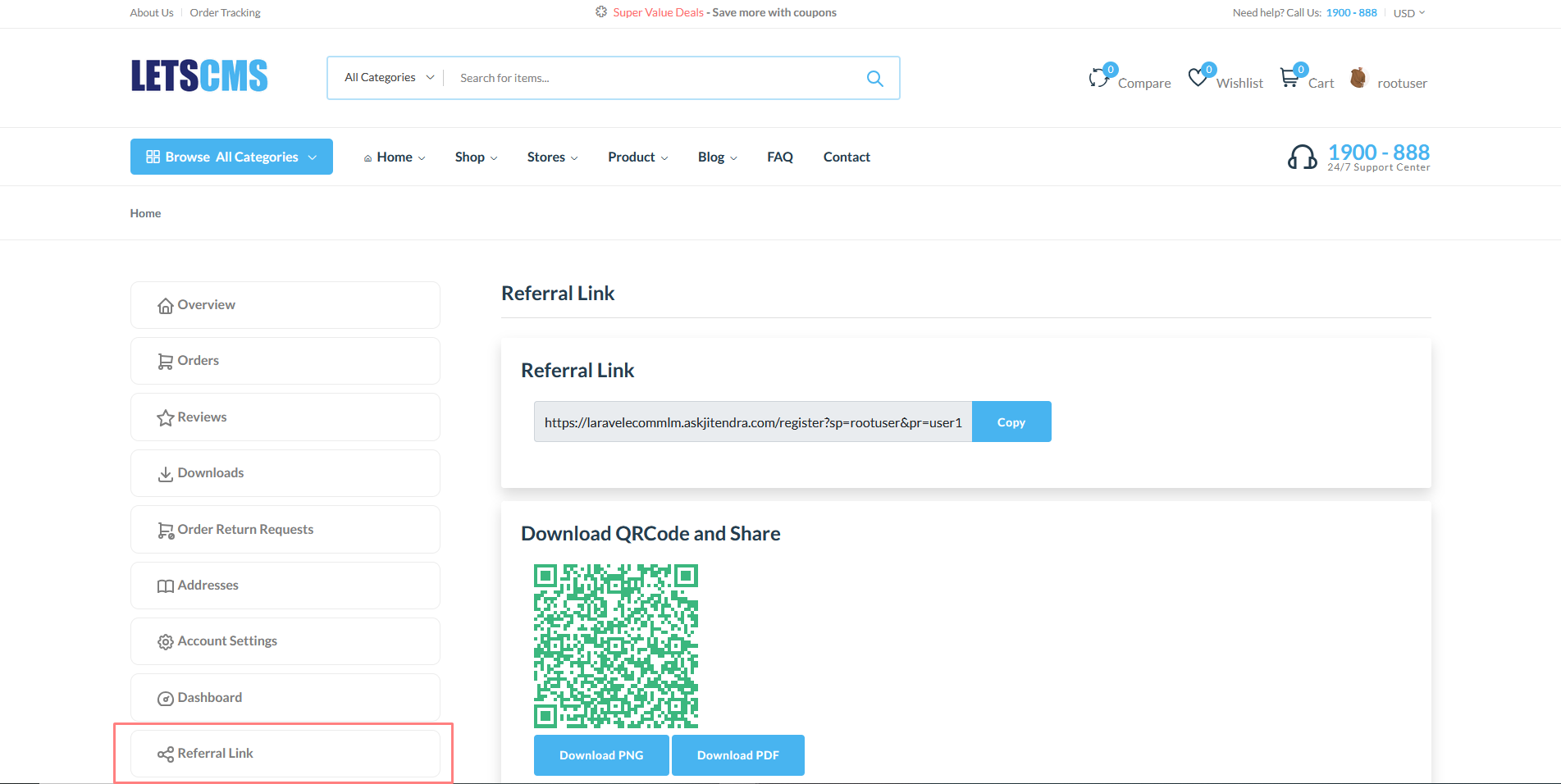
User Share your Referral Link by QRCode
User can copy referral link and share referral link for register new customer and user can download QRCode in (.PNG, .PDF) and share to anyone user for registration.
Genealogy
In the binary MLM ecommerce plan, the Genealogy Tree feature provides a visual representation of the user's MLM network structure. Here's how it typically works:
Tree Structure: The Genealogy Tree displays a hierarchical structure where each user is positioned based on their level in the MLM network. The top-level user, often referred to as the root or sponsor, is positioned at the top of the tree.

Downline Representation: Users can view their downline members, who are positioned below them in the tree structure. Each downline member represents someone who has been directly or indirectly recruited by the user.
Payouts Report
User can display your payouts list whatever commissions he could have gotted. such as how much total commission and how much service charge apply and how much net amount etc.

Join Commissions
User can display your Join Commissions that after purchasing how much join commission amount he get it.

Referral Commission
User can display your Referral Commissions that when user refer the new user then he will get referral commission.

Level Commission
User can display your Level Commissions that when new user purchase then upper level user get commission till number of level that is define in admin general settings.

Pair Commission
Display user Pair Commissions that when new user registered in left leg and right leg then match pair 1:1 then he will pair commission is % of sum both purchasing .

Level Commission
User can display your Fast Start Bonus that when fullfill the bonus requirements.

Bank Details
Users have the option to provide their bank account details for receiving payouts via bank transfer. They can securely input their bank account information, including account number, bank name, and account holder name etc.

Withdrawals
Users can access a withdrawal history that provides a comprehensive record of all their past withdrawal requests. This history includes details such as withdrawal amount, date requested, payment method, and status.
Withdrawal Requests : Users can initiate withdrawal requests. They specify the amount they wish to withdraw and select their preferred withdrawal method (e.g., bank transfer).


